This template project contains a two-axis template for getting started with a KAS application. It contains key project elements that will save development time. Additional axes can be added to the template applications that have three, four, five, or more axes. The templates are designed to easily add code to the programs and Control Panels that are in the template or to new ones. A project can contain many programs, and each program can be written in ST"Structured text" A high-level language that is block structured and syntactically resembles Pascal, SFC"Sequential function chart" It can be used to program processes that can be split into steps. The main components of SFC are: - Steps with associated actions - Transitions with associated logic conditions - Directed links between steps and transitions, FFLD, FBD"Function block diagram" A function block diagram describes a function between input variables and output variables. A function is described as a set of elementary blocks, or IL"Instruction list" This is a low-level language and resembles assembly programming languages. This template program can be run on the KAS Simulator or with a PDMM or PCMM and AKD drives.
This project contains two axes where Axis 2 is slaved to Axis 1 at a 2:1 ratio.
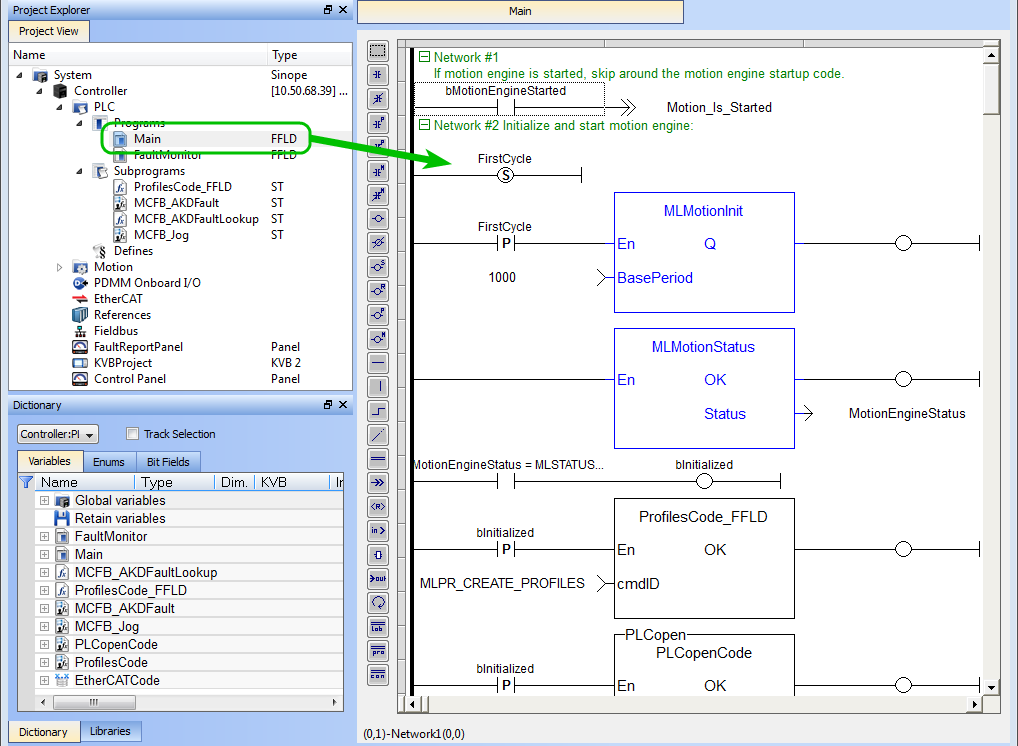
The 2-axes PLCopenA vendor -and product- independent worldwide association active in Industrial Control and aiming at standardizing PLC file formats based on XML template has a FFLD program (called Main) that initializes and starts the motion. The motion includes single axis jogging, incremental and absolute moves, and gearing motion between axes. Also included are controls to enable/disable the drives, clear faults, and display fault and axis position information in the Control Panel.
Figure 11-56: PLCopen Template with FFLD - Main
The template contains two PLCopen Servo axes where User Units, Update Rate, Rollover Position, and Axis Limits are defined as follows:
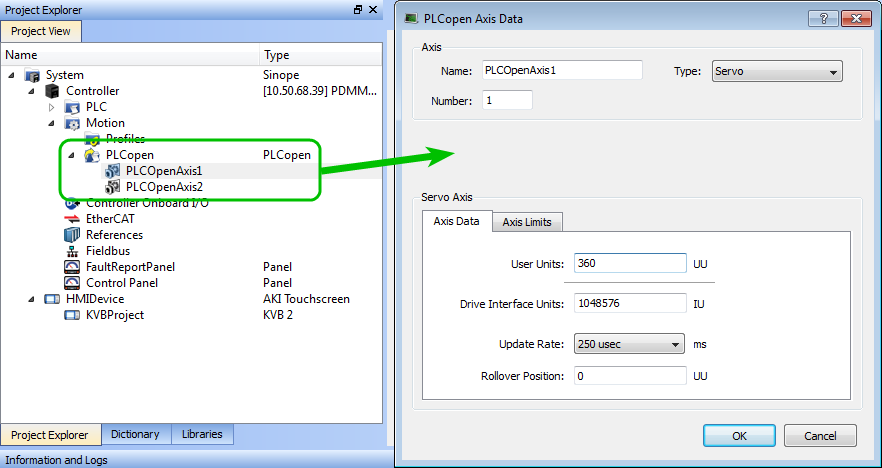
Figure 11-57: PLCopen Template - Motion
For more details on PLcopen axis parameters, see "Axis Data Parameters"
The template contains a Control Panel which works inside of the IDE"Integrated development environment" An integrated development environment is a type of computer software that assists computer programmers in developing software. IDEs normally consist of a source code editor, a compiler and/or interpreter, build-automation tools, and a debugger when running a project, and serves as a useful tool to run and debug programs. The Control Panel consists of two screens, named Control Panel and Fault Report Panel.
Control Panel consists of three sections.
For more details, see Design the Control Panel with the Internal Control Panel Editor
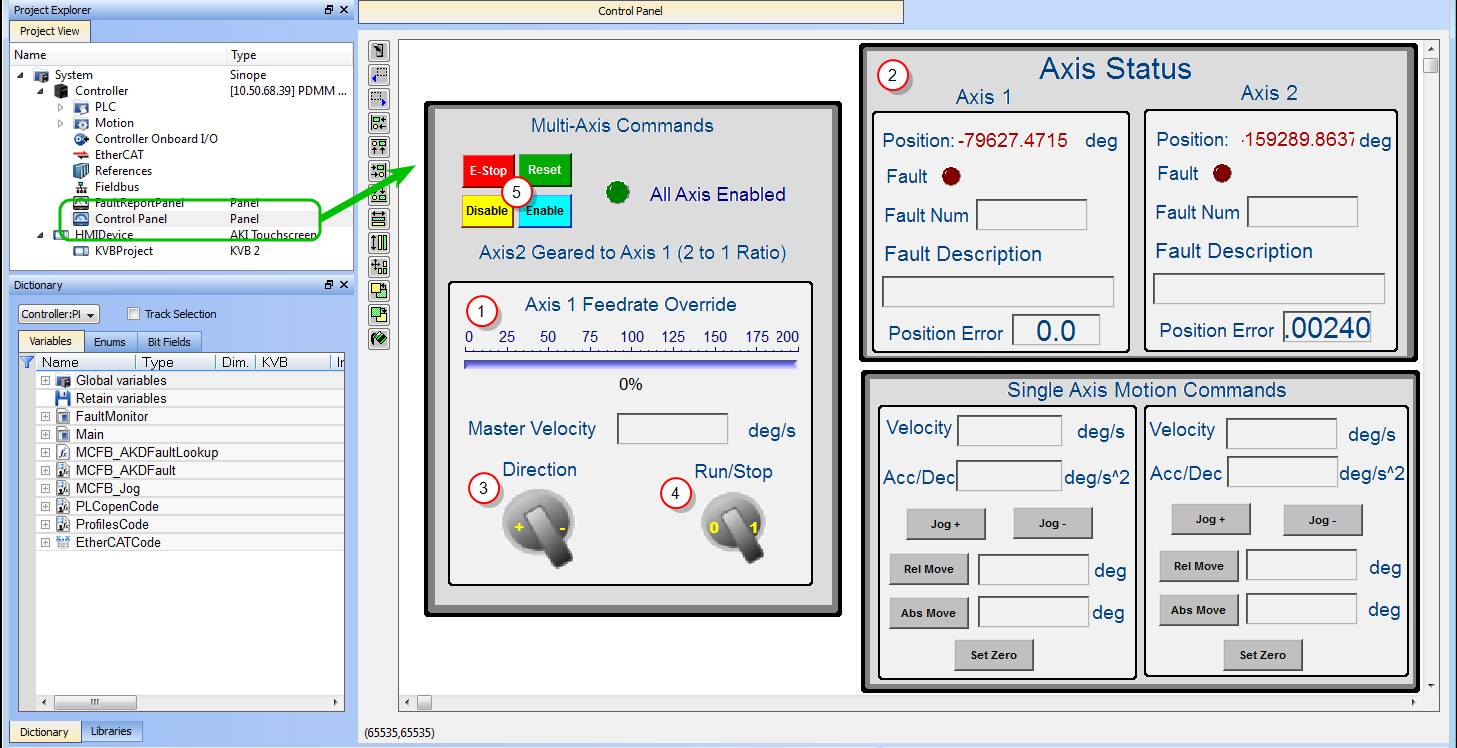
Figure 11-58: PLCopen Template - Control Panel
| Call out# | Description |
|---|---|

|
Allows you to set the speed |

|
Displays the actual position for each axis |

|
Select the direction of rotation clockwise (-) or anticlockwise (+) |

|
Start or stop the motion on the condition that the axes are enable (the green light must be switched on) |

|
Allows to enable or disable the axes. After an emergency stop, you need to select the ResetNew start of the microprocessor and EnableEnable signal for the drive, Hardware-Enable with 24V signal to X8, Software-Enable command by setup Software, fieldbus or permanently set. Both are required for enabling the drive. commands before running the axes |
Table 11-42: PLCopen Template - Control Panel elements
Fault Report Panel provides more detailed information about when a drive fault occurs.
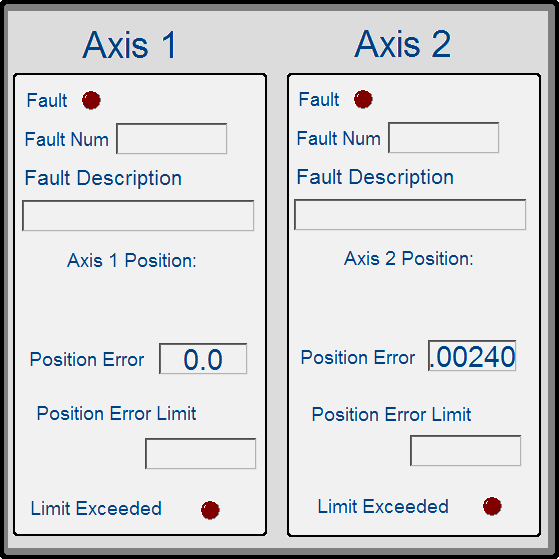
Figure 11-59: PLCopen Template - Fault Report Panel
Based on the template, the project can be run:
|
Stay Connected with Kollmorgen       
|
Copyright © 2015 Kollmorgen™ |

|